
API & Backend
Kubernetes graceful shutdown: test preStop and SIGTERM

Kubernetes graceful shutdown gives a terminating Pod time to finish work, but the application must stop admitting new requests and complete those it already accepted. A preStop hook can begin draining before SIGTERM arrives. Its execution consumes the Pod’s termination grace period, so the hook and application share that time budget.
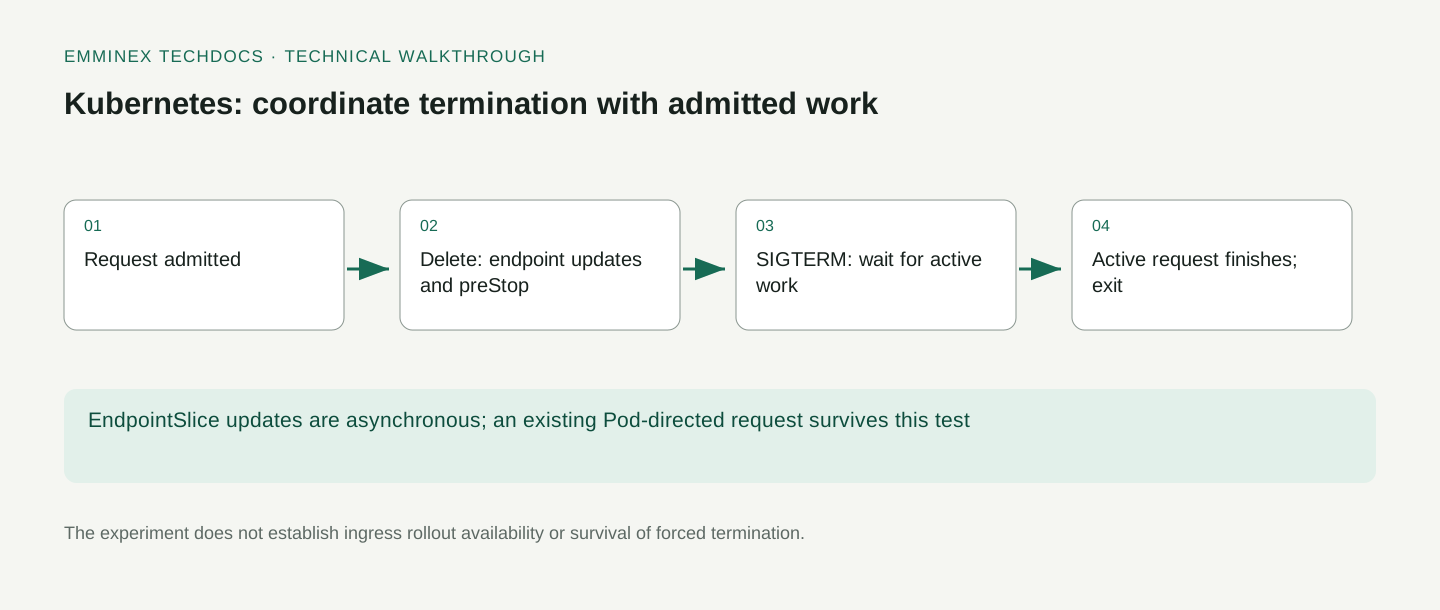
This Kubernetes 1.34.0 lab starts a six-second request, deletes the Pod, and follows the request through draining and process exit. It captures EndpointSlice conditions and application logs, then requires a successful client response. The client uses a Pod port-forward, which isolates application shutdown from ingress and load-balancer behavior. Testing a production rollout means extending this request test through the routing path your users actually take.
The Kubernetes example and test runner are available with the recorded results.
Create a disposable kind cluster
Before you start:
- Install Python 3.11 or newer, Git, and Docker. Confirm the Docker engine is running with
docker info. - Run the commands from the repository root after cloning. The examples use pinned container versions and download them on the first run.
- Install kind 0.30.0 and kubectl 1.34.x. The harness creates its own cluster and kubeconfig.
The harness creates a uniquely named cluster and passes an explicit temporary kubeconfig to every kubectl command. It deletes that cluster afterward, without selecting or modifying your existing Kubernetes context.
git clone https://github.com/emminextechdocs/developer-examples.git
cd developer-examples
python3 deep-dives/walkthrough.py kubernetes
The kind quickstart documents installation and local cluster behavior. The first run needs network access for container images. Set the KIND environment variable if the binary is not named kind on your PATH.
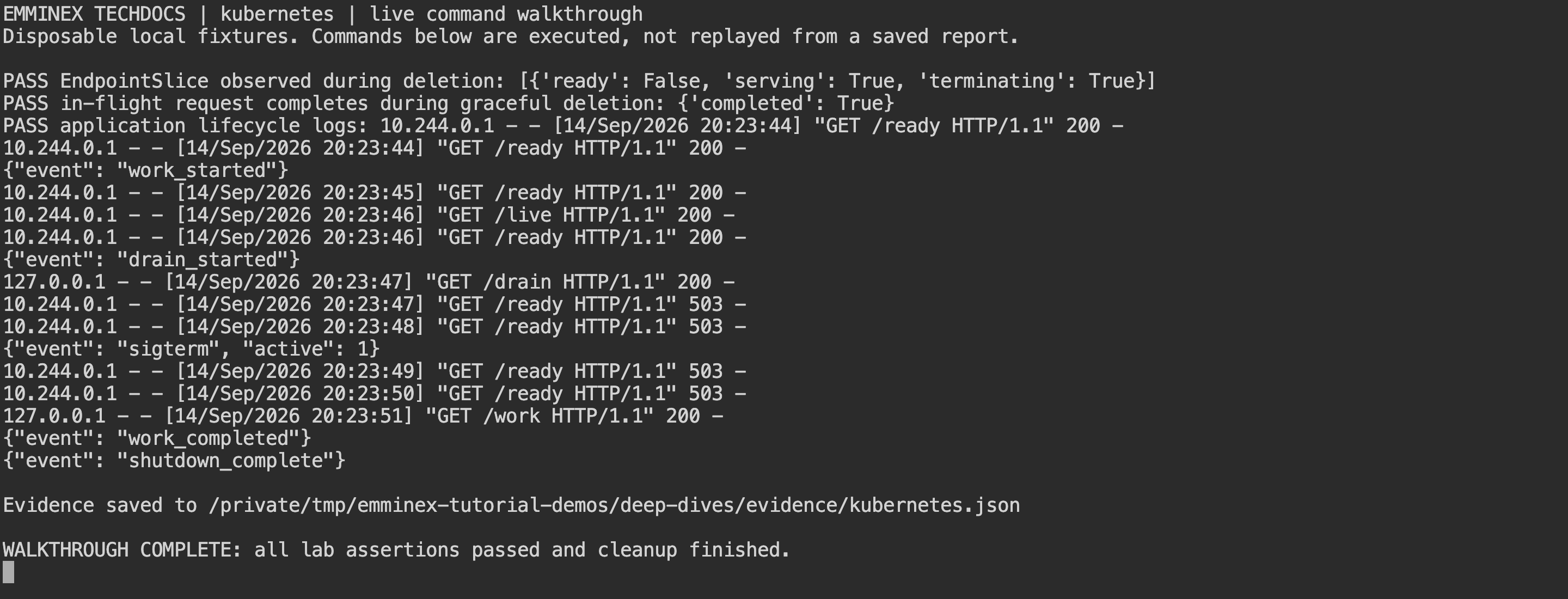
walkthrough.py runs the lab and prints selected commands and their responses alongside the assertions. Open the full-resolution capture.
Inspect the result before changing the example
The runner writes a fresh JSON record and exits after cleanup. To print only its assertions, run:
python3 - <<'PYTHON'
import json
from pathlib import Path
report = json.loads(Path("deep-dives/evidence/kubernetes.json").read_text())
assert report["passed"] is True
for event in report["events"]:
    if "assertion" in event:
        print(event["assertion"], "=>", event["actual"])
PYTHON
This prints each assertion and its observed value from your latest run. If a check fails, fix its setup or implementation and rerun the lab. The following sections explain what the checks establish.
Readiness and request draining serve different purposes
Readiness expresses whether a container should receive normal traffic through the relevant service mechanism. Draining is application behavior: stop accepting new business work while allowing existing work to finish. A readiness failure alone does not implement that behavior inside the server.
Our application has a draining flag and an active request count. New work is rejected after draining begins. Requests already counted as active continue. The readiness endpoint returns 503 during draining, while the liveness endpoint remains successful.
The probe documentation explains the different purposes of readiness and liveness. Treating an intentionally draining application as unhealthy for liveness can work against the graceful shutdown you are trying to achieve.
Stop request admission with a shared lock
The work handler acquires a lock before checking draining and incrementing active. The draining check and counter increment therefore happen in one critical section. A request either joins the active population before draining or is rejected afterward.
"""Demonstrate draining existing work; not a production HTTP server."""
from http.server import BaseHTTPRequestHandler, ThreadingHTTPServer
import json
import signal
import threading
import time

lock = threading.Lock()
active = 0
draining = False

def log(event, **fields):
    print(json.dumps({"event": event, **fields}), flush=True)

class Handler(BaseHTTPRequestHandler):
    def reply(self, code, body):
        raw = json.dumps(body).encode()
        self.send_response(code)
        self.send_header("Content-Type", "application/json")
        self.send_header("Content-Length", str(len(raw)))
        self.end_headers()
        self.wfile.write(raw)

    def do_GET(self):
        global active, draining
        if self.path == "/drain":
            with lock:
                draining = True
            log("drain_started")
            self.reply(200, {"draining": True})
            return
        if self.path in ("/ready", "/live"):
            self.reply(503 if self.path == "/ready" and draining else 200, {"draining": draining})
            return
        with lock:
            if draining:
                admitted = False
            else:
                active += 1
                admitted = True
        if not admitted:
            self.reply(503, {"reason": "draining"})
            return
        log("work_started")
        try:
            time.sleep(6)
            self.reply(200, {"completed": True})
            log("work_completed")
        finally:
            with lock:
                active -= 1

server = ThreadingHTTPServer(("0.0.0.0", 8080), Handler)

def stop(signum, frame):
    global draining
    with lock:
        draining = True
        count = active
    log("sigterm", active=count)
    def finish():
        while True:
            with lock:
                if active == 0:
                    break
            time.sleep(0.05)
        # shutdown must run on a different thread from serve_forever.
        server.shutdown()
    threading.Thread(target=finish).start()

signal.signal(signal.SIGTERM, stop)
server.serve_forever()
server.server_close()
log("shutdown_complete")
The counter is decremented in a finally block, so an exception while writing the response does not leave the shutdown loop waiting forever for this request’s accounting entry. The handler logs the important transitions without including user data.
This server is a concurrency fixture, not a production framework recommendation. Your framework may provide its own connection-draining and shutdown APIs. Preserve the admission invariant when adapting it, and test long-running handlers, streaming responses, and background work according to the framework’s actual behavior.
Wait for active work after SIGTERM
The signal handler marks the application as draining and starts a separate thread that waits for active to reach zero. That thread calls server.shutdown(). The main thread can then leave serve_forever, close the server, and record shutdown completion.
The Python socketserver documentation warns that shutdown must be called from a different thread while serve_forever is running to avoid deadlock. The signal documentation explains Python’s signal-handler execution model.
Keep signal handling small and predictable. In a real service, a bounded drain deadline should exist inside the application as well as outside it. This fixture has a known six-second handler and relies on Kubernetes’s outer grace period. Add an application deadline for handlers that might never finish.
Set preStop and the termination grace period
The Pod gets a twenty-second termination grace period. Its preStop hook calls /drain and then waits two seconds. The application is launched directly with the exec-form container command, so it is the process receiving the termination signal without an intervening shell process.
The lifecycle settings are in deep-dives/kubernetes/pod.yml; the complete file also defines the Service used for EndpointSlice inspection.
apiVersion: v1
kind: Pod
metadata:
  name: draining-app
  labels: {app: draining-app}
spec:
  terminationGracePeriodSeconds: 20
  restartPolicy: Never
  containers:
    - name: app
      image: python:3.13.7-alpine
      command: [python, /app/app.py]
      ports: [{containerPort: 8080}]
      resources:
        requests: {cpu: 50m, memory: 32Mi}
        limits: {cpu: 500m, memory: 128Mi}
      readinessProbe:
        httpGet: {path: /ready, port: 8080}
        periodSeconds: 1
        failureThreshold: 1
      livenessProbe:
        httpGet: {path: /live, port: 8080}
        periodSeconds: 5
      lifecycle:
        preStop:
          exec:
            command:
              - python
              - -c
              - "import urllib.request,time; urllib.request.urlopen('http://127.0.0.1:8080/drain').read(); time.sleep(2)"
      volumeMounts: [{name: app, mountPath: /app, readOnly: true}]
  volumes:
    - name: app
      configMap: {name: draining-app}
---
apiVersion: v1
kind: Service
metadata:
  name: draining-app
spec:
  selector: {app: draining-app}
  ports: [{port: 8080, targetPort: 8080}]
Read the shutdown timing from the manifest:
- The Pod has a 20-second termination grace period.
preStopcalls the application’s drain endpoint, then waits two seconds.- Readiness probes see the application stop accepting work; liveness remains a separate check.
- The hook consumes part of the grace period, so the application does not receive a fresh 20 seconds after the hook finishes.
The container lifecycle-hook documentation describes preStop execution. The hook’s time is part of the termination process; do not add a long hook delay while assuming the full original grace period remains afterward for application work.
The two-second wait is a fixture choice, not a universal propagation guarantee. A production delay should be justified against the actual routing path and measured termination behavior. A sleep can allow time for coordination, but it does not prove every intermediary has stopped sending traffic.
Start a request before deleting the Pod
The harness waits for the Pod to become ready, opens a port-forward to it, and starts the six-second request. It then waits until the application log contains work_started before issuing the deletion request.
Waiting for the log establishes that the request was admitted. Deleting the Pod immediately after launching a client process could race request admission and accidentally test rejection of new work instead of completion of existing work. The log confirms that the active-request counter already includes this request.
The port-forward deliberately targets the Pod. This test verifies an existing request’s survival during graceful deletion; it does not test new requests traveling through a Service, ingress controller, or external load balancer. Use the same admitted-request check when adding the real routing path.
Read EndpointSlice conditions during termination
After deletion begins, the harness retrieves the Service’s EndpointSlice. In the recorded run, the endpoint reports ready: false, terminating: true, and serving: true. That combination distinguishes termination from an immediate claim that the endpoint can no longer serve existing traffic.
The EndpointSlice documentation defines these conditions. The control plane and consumers of endpoint information act asynchronously, so a single snapshot is an observation of that run rather than a universal ordering barrier for every request path.
Use EndpointSlice inspection as one part of diagnosis. If a client receives an error during rollout, compare endpoint conditions, application drain logs, proxy behavior, and the client’s connection timing. Use timestamps or request identifiers to connect those observations.
Check the response and shutdown sequence
The run must produce all three kinds of evidence:
- The admitted
/workresponse completes with{"completed": true}. - An EndpointSlice observation includes
ready: falseandterminating: true. This run also observedserving: trueduring termination. - Application logs place completion before final shutdown.
These are the lifecycle events from the captured run, with HTTP access lines omitted:
{"event": "work_started"}
{"event": "drain_started"}
{"event": "sigterm", "active": 1}
{"event": "work_completed"}
{"event": "shutdown_complete"}
The active: 1 value matters: SIGTERM arrived while work was still in flight. A test that deletes an idle Pod could print a clean shutdown without exercising this path. Use the assertion-printing command near the start to inspect the complete log from your own run.
The client must receive {"completed": true}. The captured logs must include SIGTERM and shutdown_complete. The recorded sequence also shows readiness returning 503 during draining, one active request when SIGTERM arrives, and the work completing before shutdown finishes.
Together, the response and logs show whether admitted work finished during termination. Deletion alone could mean the process was terminated before finishing its work. A successful client response alone would not explain whether the request happened to finish before termination began. The combined evidence ties the request to the shutdown sequence.
The Pod lifecycle documentation describes termination and the grace period. Use that model to interpret the experiment rather than treating a successful local run as an undocumented Kubernetes promise about every application.
Set a limit for unfinished work
A grace period should account for the work the application is willing to finish after it stops admission. In this fixture, a six-second request fits within the selected budget even when deletion starts soon after admission. That is a chosen scenario, not a measurement of a production latency distribution.
Measure handler duration, streaming lifetime, background tasks, and any shutdown cleanup. Then decide what happens when the budget expires. Some work can be safely retried; other work needs a durable checkpoint or an operation-status API to resolve an uncertain outcome.
Do not increase the grace period indefinitely to hide a handler that cannot stop. Long termination can slow rollouts and leave capacity tied up. Define a bounded policy for unfinished work and test it with a handler that deliberately exceeds the budget.
Distinguish graceful deletion from force deletion
Graceful deletion and force deletion are different operations. A forced API deletion does not prove that the process finished its work, and failures below the control plane can prevent normal termination coordination. Kubernetes documents force-deletion risks in its force deletion guidance.
The fixture does not issue force deletion and does not simulate node loss or SIGKILL. Its successful request therefore cannot be used as evidence for those cases. Add distinct tests if those failures matter to the application contract.
For state-changing requests, preserve business idempotency even when graceful shutdown works well. A response can still be lost after a durable commit. Our webhook recovery guide explains why transport-level failure does not necessarily mean the business operation never happened.
Test shutdown through the production routing path
A production request may pass through a cloud load balancer, ingress controller, Service implementation, sidecar, and application connection pool. Each layer can have its own connection reuse, health checks, timeouts, and endpoint-update behavior.
Extend the fixture with the routing components you actually deploy. Generate requests continuously, record which were admitted before draining, and distinguish connection errors from application rejections. Test both existing keep-alive connections and new connections rather than grouping all traffic into one success percentage.
Do not describe the current Pod-directed experiment as a zero-downtime deployment test. It checks completion of one request during application shutdown. Availability across replacements also requires enough ready capacity and a tested controller configuration, neither of which a bare Pod fixture supplies.
Account for background work during shutdown
The fixture tracks only work handled by its HTTP endpoint. A real application may start tasks that outlive the response, maintain message-consumer loops, or flush buffered telemetry during shutdown. Define who owns those tasks and what must happen to them before exit.
Decide whether each task must finish, be checkpointed, or be handed back for retry. An HTTP active-request count cannot represent all of them unless the application deliberately ties their lifetime to that count. Document the chosen behavior so operators know which work can reappear after a restart.
Our OpenTelemetry walkthrough provides an instrumentation foundation for observing shutdown-related work. Keep telemetry flushing bounded too; the instrumentation layer should not make the application wait indefinitely after its business work is done.
Keep shutdown checks with the application
Keep the application, Pod configuration, client, and lifecycle assertions together. A change to the process entrypoint, probe behavior, or preStop hook can alter shutdown even when the request handler itself is unchanged.
Add tests for a request arriving after draining begins, a handler exceeding the grace period, and a lost client connection. If your service supports streaming or asynchronous jobs, include those explicitly. Choose assertions that describe admitted work and durable effects rather than only checking HTTP status totals.
Record the Kubernetes, kind, client, and application versions used. Local clusters are useful for reproducibility, but they do not reproduce every production networking or node configuration. Treat the test as a maintained piece of evidence and extend it where the production path differs.
Verify rejection after draining starts
The fixture’s handler checks draining before incrementing its active count. That is the intended admission boundary. A production regression suite should send a second request after the drain log appears and require the documented rejection or rerouting behavior, while still requiring the already admitted request to finish.
Identify admitted requests when counting rollout errors. A deliberate rejection after shutdown begins may be recoverable by the caller, while interrupting a previously accepted state-changing operation can create an uncertain outcome. The API contract should explain how clients distinguish or recover from those cases.
Also inspect shutdown logs for work that never decrements its active accounting. The finally block in this fixture protects that counter when a response write fails, but application-specific background work may need separate completion accounting. Add a failure inside the handler and verify shutdown still reaches its bounded completion policy. Keep both response-write failure and normal completion in the shutdown regression suite.
Frequently asked questions
Does failing a readiness probe finish existing requests?
No. Readiness affects eligibility for normal Service traffic. The application must still retain and finish requests it has admitted. This server tracks active requests and waits for their count to reach zero before shutdown. The port-forwarded request test verifies that completion; it does not verify routing withdrawal through every production intermediary.
Does preStop get its own termination grace period?
No. The hook runs within the Pod’s termination grace period, before the usual TERM signal is sent to the container. Allow time for both the hook and application shutdown when choosing the budget. The lab uses a twenty-second grace period with a two-second hook wait, followed by completion of the already running request.
Can a terminating EndpointSlice endpoint still have serving: true?
Yes. The recorded snapshot has terminating: true, ready: false, and serving: true. These conditions describe different aspects of the endpoint. They are updated asynchronously, so a snapshot does not establish that every proxy has already stopped routing to it. Correlate endpoint observations with application logs and client results when investigating termination failures.
Does this test prove a Kubernetes rollout has zero downtime?
No. It verifies one admitted request through a Pod-directed connection during graceful deletion. A rollout also depends on replacement capacity, controller settings, probes, and the actual ingress and Service path. Send traffic through that path during replica replacement, and distinguish rejected new requests from interrupted admitted work when measuring the result.