
API & Backend
OAuth PKCE for CLI Apps: A Secure Implementation Guide
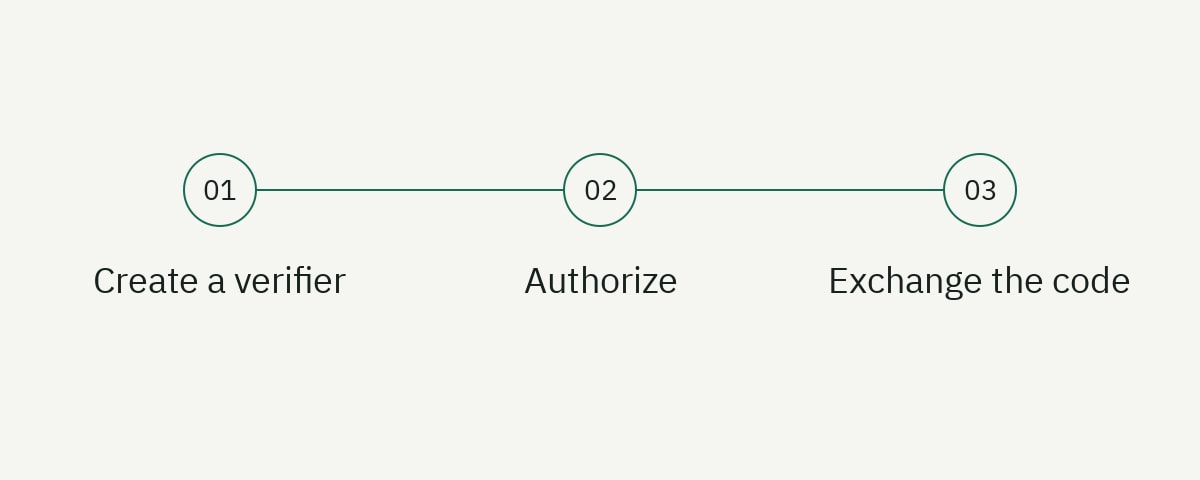
A desktop CLI should authenticate a user with the OAuth authorization code flow and Proof Key for Code Exchange (PKCE), opening the system browser and receiving the redirect on a temporary loopback listener. The CLI is a public client: it cannot keep a client secret, so security depends on PKCE, an exact redirect contract, state validation, a short-lived authorization code, and careful token storage.
This guide implements the client side in Node.js. It is an architectural template, not a drop-in client for every provider. Use your authorization server’s discovery document, scopes, redirect registration, and token-response rules. The normative starting points are RFC 8252 for native apps and RFC 7636 for PKCE.
Understand the browser-based CLI flow
The sequence is:
- The CLI generates a high-entropy code verifier, its SHA-256 challenge, and an independent state value.
- It binds an HTTP server to the loopback interface on an available port.
- It opens the provider’s authorization URL in the user’s external browser.
- The provider authenticates the user and redirects to the loopback URI with a code and state.
- The CLI validates state, closes the listener, and exchanges the code plus verifier at the token endpoint.
- It stores tokens using an appropriate credential mechanism and continues the command.
PKCE binds the authorization request to the token exchange. An attacker who intercepts the code does not know the original verifier. State binds the incoming redirect to the login attempt and helps prevent request substitution. They solve different problems; use both.
Do not embed a client secret in a distributed CLI. Anyone who can install or inspect the package can recover it. Register the CLI as a public native client, and configure the authorization server to require PKCE with the S256 challenge method.
Authentication documentation should explain this sequence rather than saying “run login.” Our API documentation guide covers the broader integration contract, and our TypeScript CLI tutorial covers command output, exit codes, packaging, and testing.
Register the native OAuth client
Create a public client with the provider. Record the client ID, authorization endpoint, token endpoint, supported scopes, and redirect rules. Do not provision a reusable client secret.
RFC 8252 allows loopback redirects such as http://127.0.0.1:{port}/oauth/callback for desktop applications. The provider should permit the port to vary while requiring the rest of the registered redirect to match. Prefer the numeric loopback address over localhost so name resolution cannot select an unintended interface.
Request the narrowest scopes the command needs. A read-only status command should not request organization administration. If different commands need different authority, consider incremental authorization or separate profiles rather than giving every login the union of all scopes.
Use OAuth discovery when the provider supports it. Validate the issuer exactly and use advertised endpoints. Do not accept an issuer or token endpoint from an untrusted command argument without an explicit enterprise configuration and trust model.
Define the expected token audience and resource. Receiving a signed token does not mean it was issued for your API. The API must validate issuer, audience, signature, time constraints, and relevant claims independently.
Generate the PKCE verifier and state
Use a cryptographically secure random source. A verifier must use the allowed unreserved character set and sufficient entropy. Base64URL-encoding 32 random bytes produces a suitable value without padding.
import crypto from 'node:crypto';

export type LoginProof = {
  verifier: string;
  challenge: string;
  state: string;
};

export function createLoginProof(): LoginProof {
  const verifier = crypto.randomBytes(32).toString('base64url');
  const challenge = crypto
    .createHash('sha256')
    .update(verifier, 'ascii')
    .digest('base64url');
  const state = crypto.randomBytes(32).toString('base64url');

  return { verifier, challenge, state };
}
Do not reuse the verifier or state across login attempts. Keep them in memory for the short duration of one flow. If the CLI must survive process restarts during login, persist an expiring encrypted transaction record and delete it after use.
Never print the verifier, authorization code, access token, refresh token, or full callback URL in normal logs. Debug mode must redact query values. Support bundles often outlive the credentials’ intended environment.
Use S256; the plain challenge method does not protect the verifier in the authorization request. If a provider does not support S256 for a public native client, treat that as a security and compatibility decision rather than silently downgrading.
Bind a temporary loopback listener
Ask the operating system for an available port by listening on port zero. Bind only to 127.0.0.1, not every interface.
import http from 'node:http';

type Callback = { code: string; state: string };

export async function listenForCallback(
  path: string,
  expectedState: string,
  timeoutMs = 120_000
): Promise<{
  redirectUri: string;
  result: Promise<Callback>;
  close: () => Promise<void>;
}> {
  if (!expectedState || !path.startsWith('/') || path.startsWith('//') || /[?#]/.test(path)) {
    throw new Error('invalid callback configuration');
  }
  let resolveResult!: (value: Callback) => void;
  let rejectResult!: (reason: Error) => void;
  const result = new Promise<Callback>((resolve, reject) => {
    resolveResult = resolve;
    rejectResult = reject;
  });
  // Keep an early timeout handled while the caller is still opening the browser.
  // Awaiting result still receives the original rejection.
  void result.catch(() => undefined);
  let settled = false;
  let timer: ReturnType<typeof setTimeout> | undefined;
  let closing: Promise<void> | undefined;

  const close = (): Promise<void> => {
    if (closing) return closing;
    clearTimeout(timer);
    if (!settled) {
      settled = true;
      rejectResult(new Error('authorization cancelled'));
    }
    closing = new Promise((resolve, reject) => {
      server.close((error) => error ? reject(error) : resolve());
      server.closeAllConnections();
    });
    return closing;
  };

  const server = http.createServer((request, response) => {
    response.setHeader('content-type', 'text/plain; charset=utf-8');
    response.setHeader('cache-control', 'no-store');
    response.setHeader('connection', 'close');
    if (settled) {
      response.writeHead(410).end('This login attempt is closed.');
      return;
    }
    if (request.method !== 'GET') {
      response.writeHead(405, { allow: 'GET' }).end('Method not allowed');
      return;
    }
    let url: URL;
    try {
      url = new URL(request.url ?? '/', 'http://127.0.0.1');
    } catch {
      response.writeHead(400).end('Invalid callback.');
      return;
    }
    if (url.pathname !== path) {
      response.writeHead(404).end('Not found');
      return;
    }

    const error = url.searchParams.get('error');
    const code = url.searchParams.get('code');
    const state = url.searchParams.get('state');

    // Validate success AND error callbacks before settling this login attempt.
    if (!state || url.searchParams.getAll('state').length !== 1 ||
        !safeEqual(state, expectedState)) {
      response.writeHead(400).end('Invalid callback state.');
      return;
    }
    if (url.searchParams.getAll('code').length > 1 ||
        url.searchParams.getAll('error').length > 1 || (code && error)) {
      response.writeHead(400).end('Invalid callback parameters.');
      return;
    }
    if (error) {
      settled = true;
      clearTimeout(timer);
      response.once('finish', () => { void close().catch(() => undefined); });
      response.writeHead(400)
        .end('Authorization was not completed. Return to the terminal.');
      rejectResult(new Error('authorization was declined or failed'));
      return;
    }

    if (!code) {
      response.writeHead(400).end('Invalid callback.');
      return;
    }

    settled = true;
    clearTimeout(timer);
    response.once('finish', () => { void close().catch(() => undefined); });
    response.writeHead(200)
      .end('Callback received. Return to the terminal to finish signing in.');
    resolveResult({ code, state });
  });
  server.headersTimeout = 5_000;
  server.requestTimeout = 10_000;
  server.setTimeout(10_000, (socket) => socket.destroy());

  await new Promise<void>((resolve, reject) => {
    server.once('error', reject);
    server.listen(0, '127.0.0.1', resolve);
  });

  const address = server.address();
  if (!address || typeof address === 'string') throw new Error('loopback address unavailable');
  const redirectUri = `http://127.0.0.1:${address.port}${path}`;

  timer = setTimeout(() => {
    if (settled) return;
    settled = true;
    rejectResult(new Error('authorization timed out'));
    void close().catch(() => undefined);
  }, timeoutMs);
  timer.unref();

  return {
    redirectUri,
    result,
    close
  };
}
The listener validates state before accepting either success or failure. A stray or malformed request cannot cancel the login attempt. It settles once, limits slow requests, and closes after a valid callback or timeout. The caller also invokes the idempotent close function in finally. Include the safeEqual helper from the next section in the same module.
The temporary HTTP listener is acceptable because traffic remains on loopback. Do not bind to 0.0.0.0, and do not expose the callback port through container publishing or remote development tunnels.
Build and open the authorization URL
Construct the URL with the platform URL API:
function buildAuthorizationUrl(input: {
  authorizationEndpoint: string;
  clientId: string;
  redirectUri: string;
  scopes: string[];
  challenge: string;
  state: string;
}): URL {
  const url = new URL(input.authorizationEndpoint);
  url.search = new URLSearchParams({
    response_type: 'code',
    client_id: input.clientId,
    redirect_uri: input.redirectUri,
    scope: input.scopes.join(' '),
    code_challenge: input.challenge,
    code_challenge_method: 'S256',
    state: input.state
  }).toString();
  return url;
}
Open the system browser with an operating-system-specific command, using spawn with an argument array and no shell. macOS uses open, Windows can use cmd /c start only with careful escaping rules, and Linux commonly uses xdg-open. A maintained library can encapsulate these differences.
Always print the authorization URL as a fallback for remote shells, locked-down desktops, and failed browser launches. In a headless environment, offer an appropriate device authorization flow only when the provider supports it; do not ask users to copy authorization codes into an improvised insecure flow.
Tell the user which host is being opened and which scopes are requested. Do not imitate the provider’s credential prompts in the terminal. Credentials belong in the provider’s browser page.
Validate the callback and exchange the code
Coordinate the flow and compare state using constant-time equality for equal-length values:
async function login(): Promise<TokenResponse> {
  const proof = createLoginProof();
  const callback = await listenForCallback('/oauth/callback', proof.state);

  try {
    const authorizationUrl = buildAuthorizationUrl({
      authorizationEndpoint: config.authorizationEndpoint,
      clientId: config.clientId,
      redirectUri: callback.redirectUri,
      scopes: ['projects:read'],
      challenge: proof.challenge,
      state: proof.state
    });

    process.stderr.write(`Complete sign-in in your browser:\n${authorizationUrl.href}\n`);
    await openBrowser(authorizationUrl.href).catch(() => {
      process.stderr.write('Could not open the browser. Use the URL above.\n');
    });

    const result = await callback.result;
    if (!safeEqual(result.state, proof.state)) {
      throw new Error('authorization state did not match');
    }

    return exchangeCode({
      code: result.code,
      verifier: proof.verifier,
      redirectUri: callback.redirectUri
    });
  } finally {
    await callback.close().catch(() => undefined);
  }
}

function safeEqual(received: string, expected: string): boolean {
  const receivedBytes = Buffer.from(received, 'utf8');
  const expectedBytes = Buffer.from(expected, 'utf8');
  return receivedBytes.length === expectedBytes.length &&
    crypto.timingSafeEqual(receivedBytes, expectedBytes);
}
Exchange the code directly with the token endpoint over TLS:
async function exchangeCode(input: {
  code: string;
  verifier: string;
  redirectUri: string;
}): Promise<TokenResponse> {
  const response = await fetch(config.tokenEndpoint, {
    method: 'POST',
    headers: { 'content-type': 'application/x-www-form-urlencoded' },
    body: new URLSearchParams({
      grant_type: 'authorization_code',
      client_id: config.clientId,
      code: input.code,
      redirect_uri: input.redirectUri,
      code_verifier: input.verifier
    }),
    signal: AbortSignal.timeout(15_000)
  });

  const body: unknown = await response.json();
  if (!response.ok) throw publicTokenError(response.status, body);
  return validateTokenResponse(body);
}
The redirect URI must be identical to the one used in the authorization request. Do not send a client secret for a public client merely because the token endpoint form accepts one.
Validate the token response: token type, access token, positive expiry, scope, and optional refresh token. Bound response size at the HTTP layer if your client permits it. Never include the raw response in an error shown to the user.
Store tokens according to the environment
Use the operating system’s credential manager for an interactive desktop CLI. Store a small account identifier and metadata separately if necessary, but keep refresh and access tokens in the protected store. Apply the narrowest filesystem permissions only as a fallback; a mode-600 plaintext file is still plaintext available to the user account and its processes.
For CI, avoid interactive login. Use workload identity, an installation token, or a short-lived service credential supplied by the CI secret store. Do not copy a developer’s refresh token into a repository variable.
Key tokens by issuer, client ID, account, and environment so staging cannot overwrite production. If the provider returns a refresh token only on the first consent, preserve rotation updates atomically. Write the replacement token before discarding the previous record according to the provider’s rotation semantics.
Provide logout that deletes local credentials and attempts server-side revocation when available. Explain that local deletion and revocation are distinct outcomes, especially when the network is unavailable.
Refresh without creating a token race
Before an API call, use an access token that remains valid for a safety window. If it is close to expiry, refresh it. Several concurrent commands or requests can otherwise refresh the same token simultaneously.
Within one process, protect refresh with a shared promise. Across processes, use an OS-level lock or credential-store mechanism, then re-read the token after acquiring the lock. Do not hold the lock while performing unrelated API calls.
let activeRefresh: Promise<TokenSet> | undefined;

export async function getValidToken(): Promise<TokenSet> {
  const stored = await credentialStore.read();
  if (stored.expiresAt > Date.now() + 60_000) return stored;

  activeRefresh ??= refresh(stored).finally(() => {
    activeRefresh = undefined;
  });
  return activeRefresh;
}
Treat invalid_grant as a signal that the session may no longer be refreshable. Delete unusable credentials and ask for login once; do not create an infinite refresh loop. Retry transient network failures with a small bounded policy and respect cancellation.
Account for clock skew. Use the server’s expires_in conservatively rather than trusting a locally decoded token expiry alone. Access tokens may be opaque, and clients should not need to inspect them.
Handle remote shells and containers
A loopback redirect opens the browser on the machine running the CLI. Over SSH, that may be a remote server where no browser exists and where 127.0.0.1 is not the user’s laptop. Do not automatically bind a public interface to make it work.
Offer one of these supported alternatives:
- A device authorization flow defined and enabled by the provider.
- A command that prints the URL and uses documented SSH port forwarding.
- An explicit non-interactive workload credential for CI.
- A login command run locally that provisions a narrowly scoped, exportable credential only when policy permits it.
Detect non-interactive terminals and provide a clear explanation. Avoid silently falling back to a weaker grant. Security-sensitive behavior should be predictable and auditable.
Containerized CLIs have the same issue: the callback listener may bind inside the container while the browser runs on the host. Document port and network requirements, or prefer device flow in that environment. Do not expose a random callback listener on a shared cluster node.
Test the complete login lifecycle
Unit-test verifier length, allowed characters, S256 challenge calculation, URL parameters, state comparison, token validation, and public error mapping. Use the known transformation example in RFC 7636 as a fixture.
Integration-test with a local fake authorization server. It should redirect with success, denial, missing state, mismatched state, malformed code, delayed response, and duplicate callbacks. Confirm that the listener closes after success, denial, timeout, and SIGINT.
Test the token endpoint returning invalid JSON, an oversized response, 400 invalid_grant, 429, and 500. Verify that no test snapshot includes secrets. Ensure structured debug logs redact authorization headers, codes, and tokens.
Run an end-to-end test against the provider’s sandbox with a dedicated account. Confirm consent text, scopes, callback behavior, refresh rotation, revocation, and logout. Manual browser testing is necessary because a mocked HTML redirect cannot prove the provider registration is correct.
Document a recovery path for “port unavailable,” “browser did not open,” “state mismatch,” “authorization timed out,” and “refresh token rejected.” These are part of the product experience, not support footnotes.
Threat-model the implementation
Consider authorization-code interception, callback injection, malicious local processes, leaked logs, dependency compromise, token theft, excessive scopes, phishing, and an attacker controlling configuration. State and PKCE are necessary but do not eliminate every local threat.
Validate endpoint schemes and hosts. Do not let a repository config redirect token exchange to an arbitrary server. Use dependency lockfiles, review the browser-opening package if you adopt one, and keep the authentication module small.
Display the real authorization hostname before opening it. The CLI should never collect the user’s password. If enterprise customers configure custom issuers, show the selected issuer and support an administrator allowlist.
Keep telemetry around outcomes, duration, provider, and public error category. Do not collect authorization URLs, codes, token fragments, usernames, or callback query strings. Authentication telemetry deserves an explicit privacy review.
Frequently asked questions
Why does a CLI need PKCE if it uses a browser?
The authorization code returns through an operating-system redirect that another local application might intercept. PKCE ensures the code cannot be exchanged without the verifier held by the CLI that started the request.
Can I put a client secret in an npm package or binary?
No distributed native application can reliably keep one shared secret. Register it as a public client and use PKCE. Use a confidential client only when the secret remains on a controlled server.
Should a CLI use localhost or 127.0.0.1?
RFC 8252 recommends the loopback IP literal. It avoids name-resolution ambiguity and helps ensure the listener stays on the intended loopback interface. The port can be selected dynamically when the provider supports native loopback redirects correctly.
What should a headless CLI use instead?
Use the OAuth device authorization flow when the provider supports it, or a dedicated workload identity for automation. Do not weaken the authorization code flow by copying secrets or exposing the callback listener publicly.
Make login boring and dependable
A secure CLI login keeps credentials in the browser, binds only to loopback, validates state, proves possession with PKCE, exchanges codes over TLS, and stores tokens outside ordinary project files. It also handles timeout, cancellation, remote environments, refresh races, revocation, and error recovery.
If your developer tool needs authentication documentation or a tested onboarding guide, explore our developer content service. Security guidance earns trust when every boundary and failure mode is explicit.