
Developer Tooling
Docker BuildKit secrets: test mounts and cache invalidation
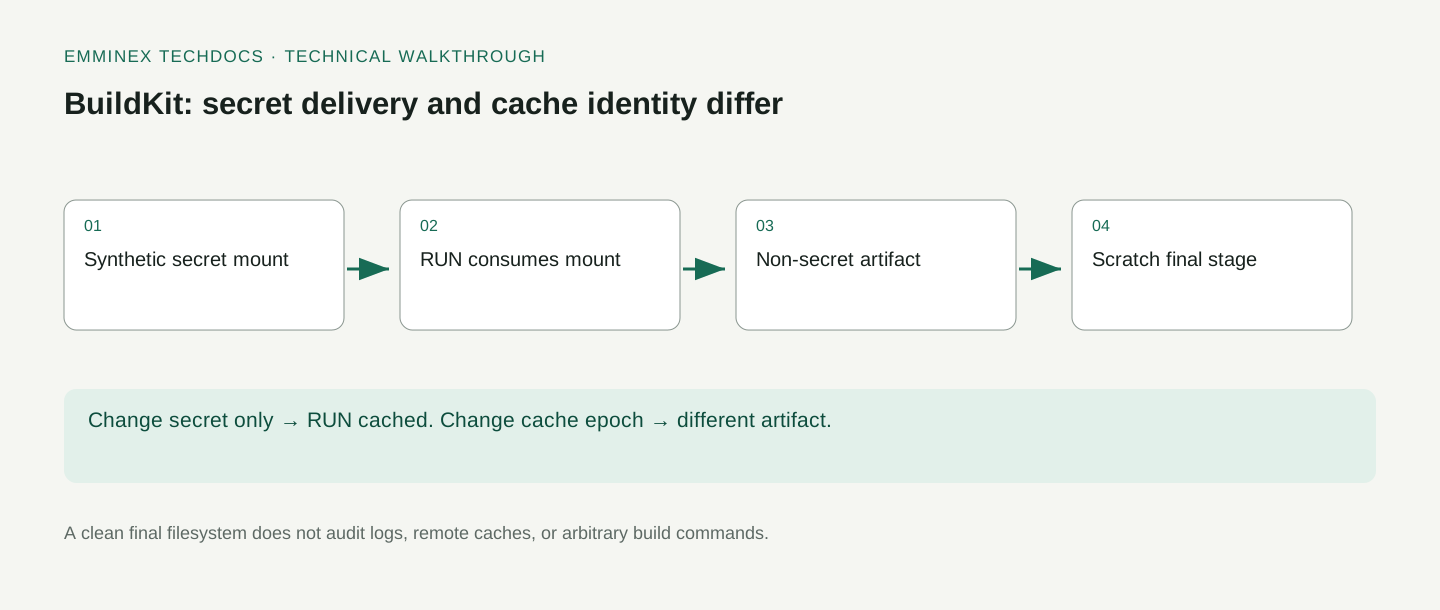
Changing a Docker BuildKit secret’s contents does not invalidate the cache for the build step that uses it. To force that step to run again, change a separate cache input, such as a non-secret build argument. A required secret is checked when the step executes, so a cached build is also a poor test of whether a credential still works.
This lab builds an artifact with a synthetic token, changes the token, and checks that the same RUN step is cached. It then changes CACHE_EPOCH, inspects the rebuilt artifact, and forces an uncached attempt without the secret. The final checks search successful build logs, the exported filesystem, and image history for accidental inclusion of the synthetic token.
The BuildKit example and test runner are available with the recorded results.
Run the BuildKit secret-mount test
Before you start:
- Install Python 3.11 or newer, Git, and Docker. Confirm the Docker engine is running with
docker info. - Run the commands from the repository root after cloning. The examples use pinned container versions and download them on the first run.
- Use a local development machine with room for disposable containers. The harness removes the resources it creates.
This experiment needs BuildKit support. The harness creates a temporary file containing a synthetic token, supplies it through --secret, and removes the file afterward. It creates a uniquely tagged image for the experiment and removes that image when finished.
git clone https://github.com/emminextechdocs/developer-examples.git
cd developer-examples
python3 deep-dives/walkthrough.py buildkit
The build uses an Alpine build stage and a scratch final stage. The resulting image contains an artifact for inspection, not a runnable application server. The runnable example is the build-and-verification workflow itself. Its evidence is saved in deep-dives/evidence/buildkit.json.
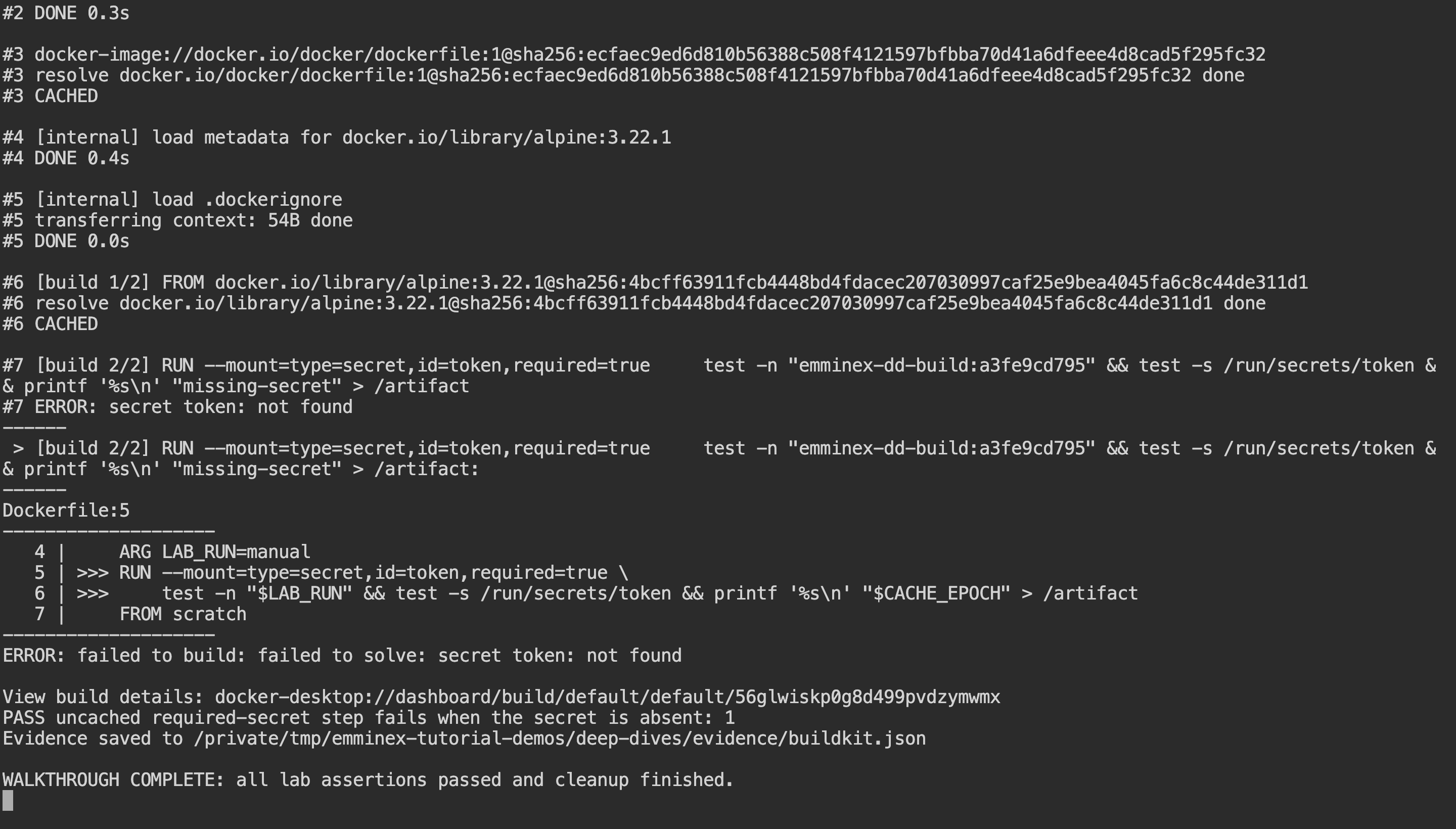
walkthrough.py runs the lab and prints selected commands and their responses alongside the assertions. Open the full-resolution capture.
Inspect the result before changing the example
The runner writes a fresh JSON record and exits after cleanup. To print only its assertions, run:
python3 - <<'PYTHON'
import json
from pathlib import Path
report = json.loads(Path("deep-dives/evidence/buildkit.json").read_text())
assert report["passed"] is True
for event in report["events"]:
    if "assertion" in event:
        print(event["assertion"], "=>", event["actual"])
PYTHON
This prints each assertion and its observed value from your latest run. If a check fails, fix its setup or implementation and rerun the lab. The following sections explain what the checks establish.
Pass credentials with a secret mount
The token is supplied as a secret mount, not an ARG or ENV value. The Dockerfile reads it only inside the relevant RUN instruction. The build-secret documentation describes this mechanism and why ordinary build arguments are unsuitable for sensitive values.
A secret mount does not make every command in the step safe. A command can still print the token, copy it into an output file, or send it to another endpoint. The build author must control those effects. The Dockerfile only checks that the secret exists and has content.
Distinguish the credential from the artifact it enables. In a real build, the credential might authorize downloading a private package. The package is intended output; the credential is not. Review both the command and its generated files rather than assuming that using the --secret flag completes the security review.
Inspect the multi-stage Dockerfile
The first stage reads the secret and writes the non-secret cache epoch into /artifact. The final stage copies that file, giving the test an observable build result without recording the token.
The build instructions are in deep-dives/buildkit/Dockerfile:
# syntax=docker/dockerfile:1
FROM alpine:3.22.1 AS build
ARG CACHE_EPOCH=1
ARG LAB_RUN=manual
RUN \
test -n "$LAB_RUN" && test -s /run/secrets/token && printf '%s\n' "$CACHE_EPOCH" > /artifact
FROM scratch
COPY /artifact /artifactFollow the data through this file:
- The build stage receives the secret only for the
RUN --mount=type=secretinstruction. required=truemakes an executed instruction fail if that secret is missing.- The non-secret
CACHE_EPOCHargument gives the test an explicit way to invalidate that build step. - The final
scratchstage copies the artifact, so the exported filesystem can be inspected without a runtime shell.
The test uses synthetic token text. It checks the final exported files, image history, and captured logs for that text; it does not claim to inspect every cache retained by the builder.
The Dockerfile reference defines secret-mount options, including the required-secret behavior. The multi-stage build guide explains copying selected artifacts between stages.
The final stage is small enough to inspect directly. If the build step writes a credential into the artifact you copy, the final stage will contain it. Review the contents of every copied artifact.
Exclude the token from the build context
The harness creates the token file in a separate temporary directory. The build context is the buildkit directory, whose .dockerignore excludes everything except the Dockerfile. That avoids making the token an ordinary context file that a later COPY could accidentally include.
*
!Dockerfile
Docker’s build-context documentation explains what is sent to the builder and how ignore files affect that set. A smaller build context also makes unintended inputs easier to find during review.
Do not rely on filename conventions alone. A secret called token.txt is still sensitive if copied into the context, and a file called .env.example can still contain a real value if somebody edits it incorrectly. Inspect the actual context and generated artifacts used by the build.
Confirm cache reuse after secret rotation
The first build uses one synthetic token and cache epoch 1. The harness changes the token contents and repeats the build with the same epoch. It checks the plain build output for the specific secret-consuming RUN step being marked CACHED.
Checking that any line says CACHED would be insufficient. A base-image or copy step could be cached while the secret-consuming command still ran. The assertion identifies the relevant instruction, making the evidence match the claim.
Docker’s cache-invalidation guide documents that secret contents do not participate in cache invalidation. A build that needs a fresh dependency fetch must request it through a cache input; rotating the credential alone does not do that.
Force a rebuild with CACHE_EPOCH
Check the three build outcomes in sequence:
- Initial build: the secret-consuming step executes and produces the artifact.
- Secret value changed, epoch unchanged: the step is cached.
- Epoch changed to
2: the step executes again.
The runner prints the actual BuildKit progress output and records these cache assertions. In deep-dives/evidence/buildkit.json, compare the build commands as well as their output: a different secret file value alone is not the cache invalidation input. Keep the epoch value non-sensitive because build arguments are not a secret transport.
The third build changes CACHE_EPOCH to 2. The Dockerfile uses that value in the artifact-producing step, and the exported artifact must contain 2. This demonstrates a deliberate cache input rather than relying on secret rotation as an implicit trigger.
The harness also supplies a unique, non-secret LAB_RUN value shared by the builds within one experiment. That separates this run from older cached experiments while preserving the comparison between its first, second, and third builds.
The epoch is not a hash of the secret. It is a separate, non-sensitive value chosen to identify a desired rebuild. Avoid placing secret-derived information into ordinary build metadata unless you have independently evaluated the exposure; the point is to keep credential handling separate from cache control.
Choose what should trigger a real rebuild. A package lockfile, dependency version, or explicit release input may be more meaningful than a manually incremented number. The fixture’s epoch keeps the mechanism visible. Your build should tie invalidation to the artifact freshness requirement it actually needs.
Test a missing required secret without cache reuse
The negative test omits the secret and uses a new cache epoch. The build must fail with a missing-secret error. Changing the epoch matters because a cached step does not need to execute the secret-consuming command again.
The requirement applies when the step executes. Reusing its cached result does not revalidate the secret. A build that succeeds from cache should not be used as an authentication probe for whether a rotated credential currently works.
Keep that distinction in CI troubleshooting. If a credential check is required, make it an explicit check with its own safe handling and outcome. Do not infer credential validity from an unrelated cached artifact that happened to build successfully during the same job.
Inspect the exported image filesystem
The harness creates a stopped container from the final image and exports its filesystem to a temporary tar archive. It reads /artifact, checks that no secret-mount path exists, and searches the exported bytes for the synthetic secret marker.
Docker’s container export reference describes the exported filesystem and its volume-related limitations. This fixture has no application volume whose contents need separate inspection. The command is being used to inspect the final container filesystem, not to audit every historical build object.
Check the other outputs too. A clean final filesystem does not by itself prove that build logs, intermediate stages, remote caches, or external endpoints never received the secret. Trace where each command reads, writes, and sends data before drawing a broader confidentiality conclusion.
Check image history for the token
The harness also runs docker history --no-trunc on the final image and checks that the synthetic token value is absent. This catches a different class of exposure from looking only at the artifact file.
The image-history reference defines the command. Its output should not be treated as a complete forensic inventory of every place a build secret could exist. Check it alongside filesystem contents, logs, and retained caches.
Keep synthetic sentinel values in regression tests. They make accidental inclusion detectable without using real credentials. If a future Dockerfile change prints the sentinel or writes it into an output file, the test can fail before the same pattern is used with a real token.
Choose a runtime stage for a real application
A scratch final stage starts without a general-purpose operating-system filesystem. In this example it receives only /artifact, which makes the final output easy to reason about. That is useful for the experiment’s inspection goal.
It does not prove that a production application can run from the same stage. An executable may need libraries, certificates, timezone data, or other files. Evaluate the application’s runtime dependencies separately instead of interpreting a successful artifact export as a successful application deployment.
The Docker build best practices discuss base-image selection and reproducibility. Select an appropriate runtime stage for the actual application, then preserve the same secret-boundary tests around the files copied into it.
Record image digests and builder versions
The fixture uses an explicit Alpine version and records build output identifying the resolved inputs. A version tag and a content digest are different forms of reference. Record the digest used by a release when you need to establish exactly which content was tested.
Also record the builder and Docker versions. Cache behavior can be influenced by which builder instance is used and what cache it has available. The comparison changes one input at a time: same Dockerfile and epoch, changed secret, then changed epoch.
Do not erase shared builder caches merely to make a tutorial run look clean. The harness removes its uniquely named image but does not perform a global prune. A production CI system can use a dedicated builder and a documented cache lifecycle appropriate to its isolation and storage requirements.
Verify the dependency fetched with the credential
A secret authorizes access; it does not establish that the downloaded dependency is the intended one. Use lockfiles, version constraints, checksums, or signature verification as appropriate to the package ecosystem. Keep those checks distinct from successful authentication.
Reuse a cached artifact when its inputs still meet the build’s freshness requirements. Force execution when those requirements change.
Our Docker Compose development guide addresses the surrounding local environment, while the docs-as-code guide discusses keeping runnable examples and their explanations synchronized. Store this build test alongside the Dockerfile so changes to one can be reviewed with the other.
Review build logs and retained caches
The final image is only one output of a build system. Builders may retain intermediate results, CI platforms retain logs, and remote cache exporters can distribute build data. Inspect those outputs separately before concluding that no secret was retained.
Review the commands that can create those outputs. Shell tracing, verbose package-manager diagnostics, and an accidental copy into a generated configuration file can disclose a secret even when the mount mechanism itself behaves correctly. Use disposable sentinel values when testing those paths so a failed test does not become a real credential incident.
Define which cache can be reused across projects and which build identities can read or write it. A cache policy is an access and reproducibility decision as well as a performance setting. The appropriate boundary depends on the CI system and the sensitivity of the artifacts being built.
Keep cleanup scoped. This harness removes the temporary token file, inspection container, exported archive, and uniquely tagged final image. It does not prune the user’s general builder cache. Inspect and manage retained builder caches separately according to your CI retention policy.
Frequently asked questions
Does changing a BuildKit secret invalidate the build cache?
Changing the secret value does not invalidate the cache. Secret properties such as its ID and mount path do participate in the cache checksum. The lab changes the token contents while keeping the Dockerfile and build arguments the same, then verifies that the particular secret-consuming RUN step is marked CACHED.
How do you force a rebuild after rotating a build secret?
Change a separate non-secret cache input that the relevant build step uses. This example changes CACHE_EPOCH and verifies the new value in the artifact. Choose a dependency version, lockfile change, or explicit rebuild value that reflects your real freshness requirement. Keep secret values and secret-derived data out of ordinary build arguments and metadata.
Why can a build succeed without executing a required-secret check?
An existing cached result can be reused without running the secret-consuming instruction. The negative test changes the cache epoch before omitting the secret, ensuring that required=true is exercised. Use an explicit authentication check if you need to know whether the current credential works; a successful cached artifact does not answer that question.
Can a secret mount still leak a credential?
Yes. A command can print, copy, or transmit a mounted secret. This fixture avoids those operations and checks successful build logs, final filesystem content, and image history for a synthetic marker. Review intermediate outputs, retained caches, and any remote requests separately. The mount supplies the credential; the command determines what happens to its contents.